Review Comments (0) Screenshots (2) Questions & Answers (0) Votes (0) Awards (7) Wiki  
Daniusoft Studio
2.3.0
www.daniusoft.com
Shareware
$25.95  Purchase
7 people
Download Daniusoft Zune...

22.21 MBDownloaded 188 times

This software was checked for viruses Last month and was found to contain no viruses.
Click here to see antivirus report.
 
Video tutorial for Daniusoft Zune Video Converter 2.3
Frame

Review

As an all-in-one and fast Zune Video Converter software, Daniusoft Zune Video Converter can converter almost all video formats as AVI, MP4, MPG, MPEG, 3GP WMV, DAT, MOV, ASF and FLV, etc. to Zune MP4, MPEG-4, WMV and Zune audio to MP3, M4A, WMA.

This featured Zune Video Converter additionally supplies many video editing functions: video cropping to cut black edges and customize the playback screen size ( original / full screen / 16:9 / 4:3 ); movie trimming to split video file into certain pieces with precise start time & end time; video effect editing of saturation / contrast / brightness for video performance; adjustable encoding parameters with resolution for picture quality, bit rate for video size, frame rate for playback smoothness,etc.

With this wonderful Zune Video Converter, you can enjoy any videos files on your Zune anywhere and anytime.

Main Features:

- Convert Zune Video

Convert nearly all the popular video formats AVI, MP4, MPG, MPEG, 3GP, WMV, DAT, MOV, ASF and FLV to Zune MP4, MPEG-4, WMV.

- Convert Zune Audio

Rip video audio to Zune MP3, M4A, WMA.

- Keep Audio & Video sync

Powerful converting engine ensures output audio and video keep in same pace.

- Set Subtitle

Set subtitle and change the audio track & video caption as you like.

- Set Output Format

Allow you to customize the output resolution for better picture quality, bit rate for fit size, frame rate for smooth playback, and sound channel for target sound effect.

- Support sound normalization – you can preset volume of output files as you wish

- Comprehensive build-in Codec

Comprehensive build-in codec – provides you 4X conversion speed exceeds conventional converters.

- Batch Convert Mode

Enable you to merge several titles into one file without quality loss

- Crop Video

Enables you to crop off the black edges of video files to fulfill your player screen, Set the screen size by Keep original/ Full screen/ 16:9/ 4:3 to meet your various need.

- Trim Video

Helps you to slip any segment of your video file to Zune by setting the Start time and End Time precisely.

- Set Video Effect

Convert video to Zune with flexible video and audio settings: adjust Brightness / Contrast / Saturation to optimize the picture performance, and preset Volume.

- Capture picture

snapshot your favorite pictures from your Video and show it on your Zune.

- Simple-to-handle

All the conversion can be completed in a few clicks with self-explaining user interface.

- Automatic Upgrade

Provide procedures for automatic upgrades, user-friendly at any time to improve access to the latest version.

What's new in version 2.3

- Adding Zune HD video format
Zune HD MP4 Video (*.mp4)
Zune HD WMV Video (*.wmv)
- Allowed to customize output list of video format
- Add image to output video format
- Upgrade to 3.2 lowest-layer

What's new in version 1.3

1.Fix the crop bug on Vista,2.Add the index of software,3.Fix some bugs.
Report a wrong version Report a wrong program title Suggest a correction

Screenshots

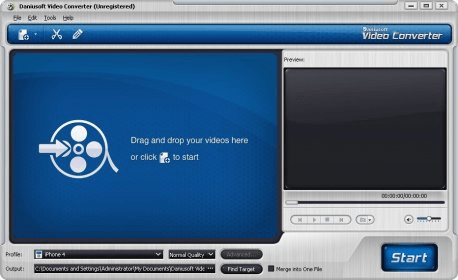
Main Interface Main Interface Main Window Main Window

Latest comments


There are no comments, be the first one!
Add new comment

E-mail Address:

Password:

Register now »

Forgot password?

Sign in with:
Download Software Informer Client
Copyright © 2012, Informer Technologies, Inc. About| Privacy and terms| Help| Feedback & Support| Partners program